
Cloud storage has become essential for both individuals and businesses, but choosing the right platform can be confusing. Many tools look similar on the surface, even though the way they handle your data can be very different. It stands out because it markets itself as a security-first storage provider rather than a general collaboration tool.
In this neutral Tresorit review, I’ll break down its features, ease of use, Tresorit pricing, the Tresorit login experience, and where it performs well — along with where it might not be the best fit.
What Is Tresorit?
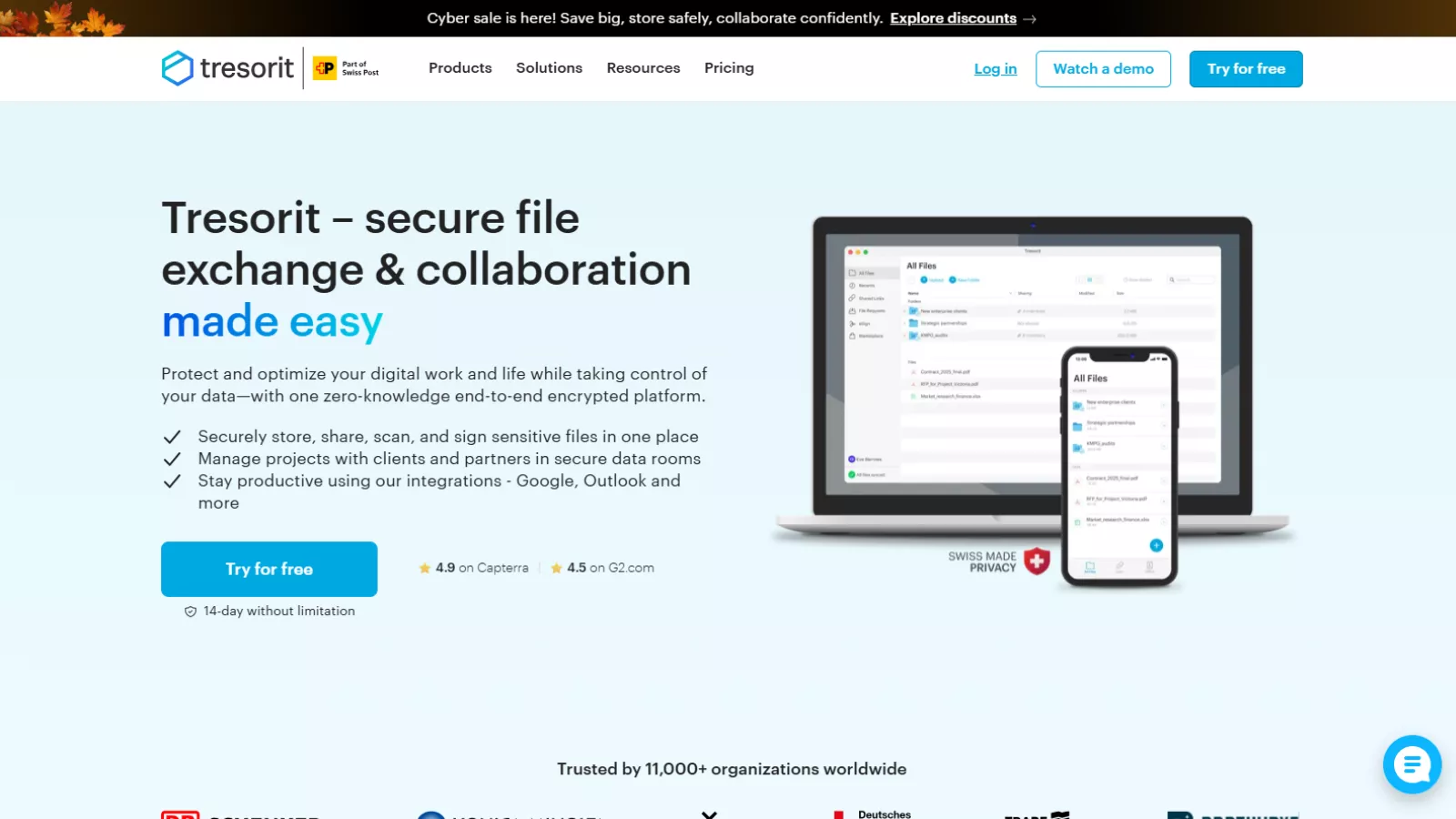 It is an encrypted cloud storage platform designed around end-to-end encryption and zero-knowledge security. Unlike mainstream services that can technically access or scan your files, Tresorit encrypts everything on your device before it ever reaches their servers.
This means the company cannot view your files even if they wanted to. For people who prioritize confidentiality, that’s a major selling point. For users who mainly want convenience and collaboration, the difference may not feel as significant.
Tresorit Login & User Experience
The Tresorit login process is straightforward: email, password, and immediate access to your files. The dashboard has a clean, minimal layout with folders, file previews, and sharing options.
The interface is not as beginner-friendly as Google Drive or Dropbox, but it isn’t overly complex either. It’s functional, slightly more serious-looking, and focused on privacy controls rather than creative collaboration tools.
On mobile, Tresorit works smoothly. Uploading files, taking scans, and checking folders is quick, though syncing large files may feel slower compared to mainstream competitors. That’s expected with end-to-end encryption since files undergo an additional security step.
Overall, the user experience is solid, but not the easiest for someone switching from a more casual storage service.
Who Is Tresorit For?
It is best suited for users and organizations that prioritize data security more than anything else. Examples include:
- Businesses handling confidential client information.
- Legal or financial professionals
- Health-related services following strict privacy standards
- Journalists, researchers, and independent professionals
- Individuals who prefer an encrypted alternative to Big Tech tools
If your highest priority is collaboration, live editing, or low-cost storage, Tresorit might not be your best match. But if encryption and privacy matter most, Tresorit aligns well with that goal.
Tresorit’s Key Features
Below is a neutral overview of Tresorit’s most notable features, without marketing exaggeration:
End-to-End Encryption
Every file is encrypted locally before upload. Only the file owner and authorized users can decrypt content. It doesn’t hold decryption keys, making unauthorized access extremely difficult.
Zero-Knowledge Security
This means it cannot reset your password in the same way Google or Dropbox can. It also means they cannot read your stored files. If you lose your password, access recovery is limited.
Secure File Sharing
You can share files via links with added layers such as password protection, download limits, and expiration settings. This does give more control compared to some mainstream platforms.
Cross-Device Syncing
It supports Windows, macOS, Linux, iOS, and Android. Syncing works reliably, but very large files may sync slower due to encryption overhead.
Compliance Support
Tresorit follows strict European privacy regulations (including GDPR), making it appealing for organizations with compliance requirements.
File Versioning & Recovery
It includes version history and deleted file recovery, which are helpful for preventing accidental data loss.
Team Controls
Admins can assign permissions, monitor access, and manage team activity logs. These features matter more for businesses than for individual users.
Tresorit Pricing – Is It Worth It?
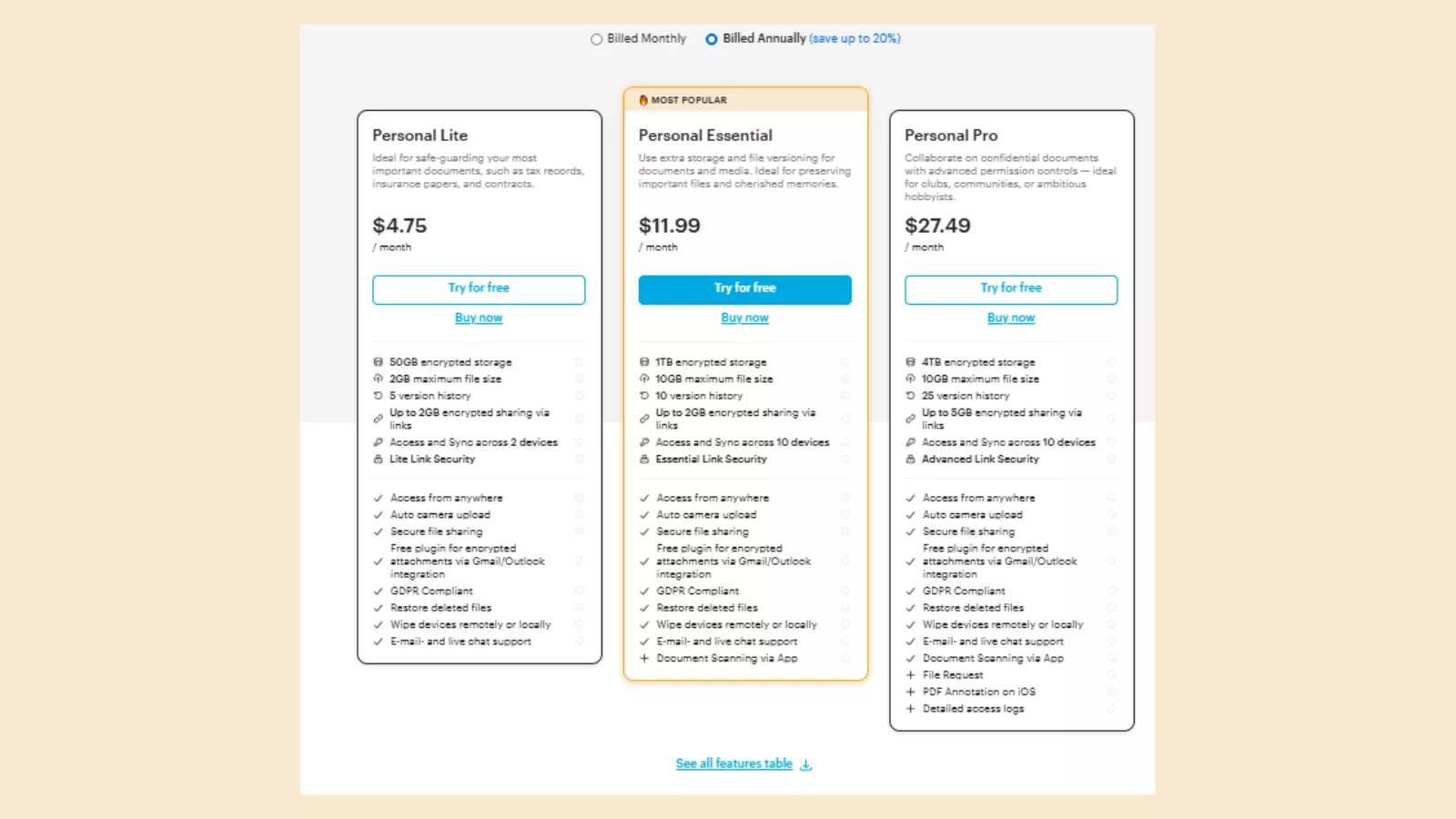 Tresorit’s pricing leans toward the premium side, but the plans justify the cost for users who prioritize airtight security over cheap storage. The Personal Lite plan at $4.75/month is the most affordable option, offering 50GB of encrypted storage, basic versioning, and access on two devices. It’s suitable for individuals who only need secure storage for essential documents.
For users with larger storage needs, the Personal Essential plan at $11.99/month bumps you up to 1TB, supports 10 devices, offers larger file size limits, and includes additional features like document scanning. It’s noticeably more expensive than mainstream cloud storage options, but you’re paying for end-to-end encryption, GDPR compliance, remote wipe, and secure email attachment tools that most competitors don’t include.
Overall, pricing is best suited for privacy-focused users who want uncompromising security rather than the lowest cost per GB.
Where Tresorit Performs Well
Based on testing and user trends, here are areas where it delivers strong performance:
- Top-tier encryption and data privacy
- Consistent syncing and dependable security architecture
- Reliable file-sharing controls with more restrictions than mainstream platforms
- A serious, business-ready interface
- Compliance-friendly setup for regulated industries
Its main advantage is that it does exactly what it claims: secure storage. There are no hidden data-tracking concerns or scanning algorithms running in the background.
Where Tresorit Could Improve
Even though Tresorit performs well in security, it isn’t perfect. Depending on your needs, these points may matter:
- It lacks collaborative document editing (like Google Docs)
- Interface feels slightly more rigid than casual users may prefer
- Storage space can feel limited at the same price point
- Some advanced sharing options require a learning curve
- Syncing large files can be slower due to encryption processes
None of these are dealbreakers for the right user, but they’re worth considering if you need a more flexible, collaboration-focused tool.
Tresorit vs Other Cloud Storage Platforms
To keep this comparison neutral:
Tresorit vs Google Drive
Google Drive excels at collaboration, real-time editing, and ease of use. Tresorit wins in privacy and encryption. Users pick one or the other depending on priorities.
Tresorit vs Dropbox
Dropbox is simple and fast for everyday storage, but its encryption model is not as private. Tresorit is more suitable for confidential or regulated work environments.
Tresorit vs OneDrive
Microsoft OneDrive integrates tightly with Office apps and Windows. Tresorit focuses on independent encrypted storage with stronger privacy protections.
My Experience Using Tresorit
Testing Tresorit across both desktop and mobile gave me a realistic view of the platform. The setup was easy, and the Tresorit login felt secure without being inconvenient. Uploading files was smooth, and the interface was clean.
The strongest impression Tresorit gave me is predictability. Everything does what it’s supposed to do, without feeling flashy or trying to replace your office tools. It works best when treated as a secure vault rather than an all-in-one productivity suite.
File sharing was straightforward, and the added controls like password protection or expiration dates were genuinely useful. On the downside, switching from platforms like Google Drive makes the difference in speed and convenience noticeable — but expected.
Overall, the experience was stable, consistent, and focused on security above everything else.
Final Verdict: Is Tresorit the Right Choice?
Tresorit is not designed for everyone, and that’s intentional. It fits a specific type of user: someone who values privacy more than collaborative features or low-cost storage.
Choose Tresorit if you:
- need high-security cloud storage
- work with sensitive files
- want full control over who can access your data
- prefer zero-knowledge architecture
- work in a regulated industry
You may want a different platform if you:
- want inexpensive storage
- rely heavily on collaborative editing
- prefer a more visually flexible interface
As a neutral conclusion: Tresorit is excellent at what it focuses on — secure, encrypted file storage — but it is not a universal solution for all cloud storage needs.
FAQs
1. Is Tresorit secure?
Yes. it is one of the strongest encrypted storage solutions available, using end-to-end encryption and zero-knowledge technology.
2. How does the Tresorit login system work?
You log in normally, but Tresorit does not store your decryption keys. This means your files remain unreadable to the company.
3. How expensive is Tresorit?
Tresorit pricing is higher than mainstream platforms, but you are paying for advanced encryption and compliance features.
4. Can Tresorit replace Google Drive?
Not completely. Tresorit is better for privacy, while Google Drive is better for collaboration.
5. Is Tresorit suitable for teams?
Yes, especially teams that need strict access controls, encrypted sharing, and compliance-ready storage.